
Launching a new website is exciting. You have invested time into the design, written your content, added your services, and finally put it live.
But then comes the next question:
Why is my website not showing on Google yet?
For many business owners, this can be confusing. Your website is live. You can visit it by typing in the address. Everything looks ready. But when you search for your business, service, or even a specific page, it may not appear straight away.
The good news is that this is normal. A new website does not always show on Google immediately. There are a few stages Google needs to go through before your pages can appear in search results.
How long does it usually take?
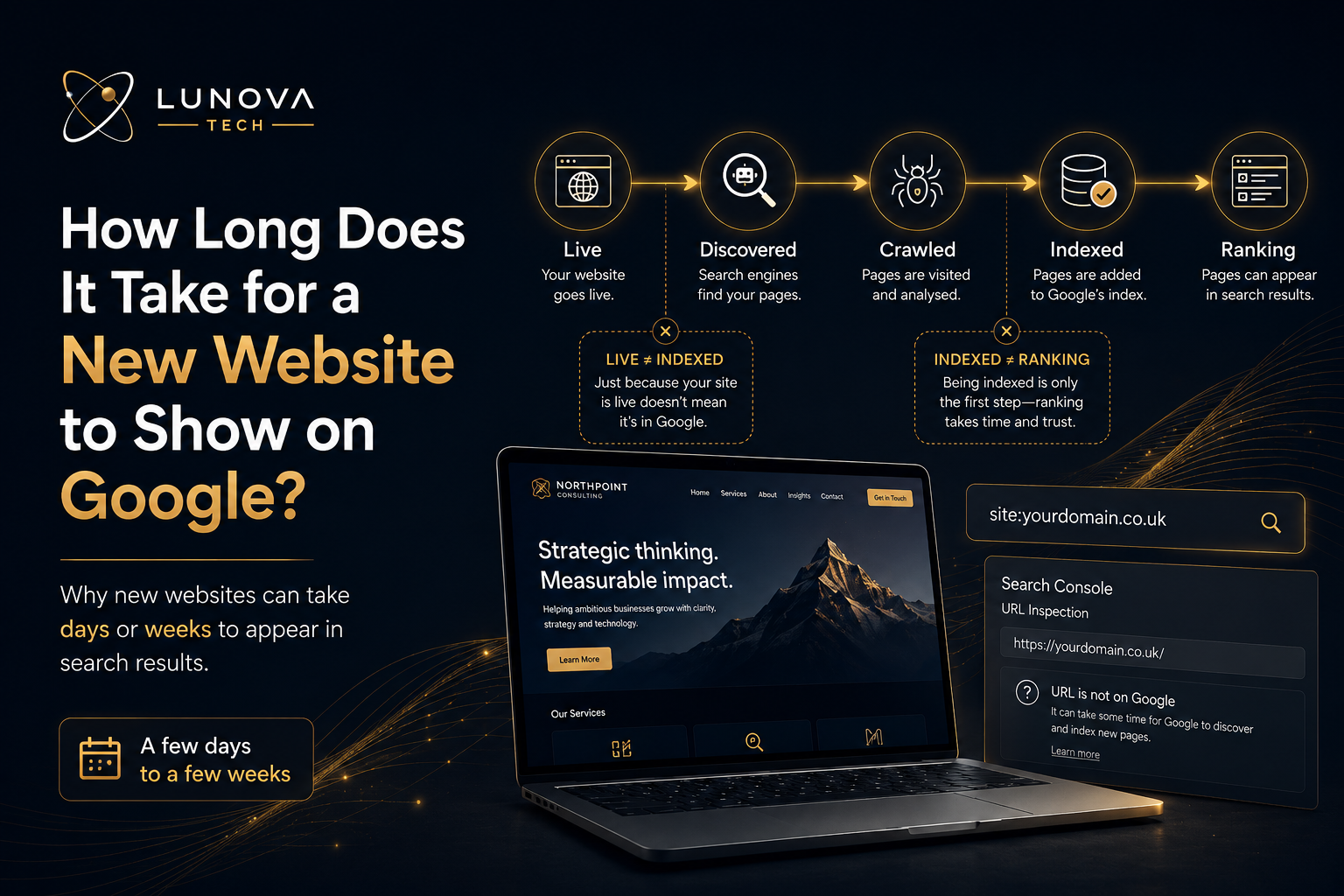
A new website can start appearing on Google within a few days, but it can also take a few weeks. In some cases, it may take longer depending on the website, the quality of the pages, how easy the site is to crawl, and whether Google has discovered the pages yet.
There is no guaranteed timeframe.
Google needs to discover your website, crawl the pages, understand the content, and then decide whether those pages should be added to its index. Only after that can your website appear in search results.
For a simple business website, you may see the homepage appear first. Other pages, such as service pages or blog posts, may appear later.
Being live is not the same as being indexed
One common misunderstanding is thinking that because a website is live, it must already be on Google.
That is not always the case.
A live website simply means people can visit it if they know the URL. Being indexed means Google has found the page and added it to its search system.
For example, your website could be live at:
www.yourbusiness.co.uk
but Google may not show it in search results until it has crawled and indexed the page.
This is why a brand-new site may be accessible to customers who have the direct link, but still not appear when someone searches on Google.
Indexed does not always mean ranking
Another important point is that being indexed does not automatically mean your website will rank highly.
A page can be indexed by Google but still appear very low in search results, especially if the website is new or competing against more established businesses.
Indexing simply means Google knows the page exists. Ranking is about where that page appears when someone searches.
For example, your page might be indexed, but it may not appear on page one for a competitive search such as “web design agency” or “CRM automation services.” That depends on many other factors, including content quality, relevance, competition, page speed, mobile usability, backlinks, and how well the page matches the search intent.
How can you check if your website is on Google?
A quick way to check is to search Google using:
site:yourdomain.co.uk
For example:
site:lunovatech.co.uk
This shows pages from your website that Google currently knows about.
You can also search for a specific page, such as:
site:yourdomain.co.uk/services
or:
site:yourdomain.co.uk/blog-title
If the page appears, it is likely indexed.
The most reliable method is to use Google Search Console. Inside Search Console, the URL Inspection tool lets you check a specific page and see whether Google has indexed it.
If it says “URL is on Google,” that means the page is indexed. If it says the page is not indexed, Search Console will usually give a reason.
Why might a new website not show on Google yet?
There are several reasons a new website may not appear straight away.
1. Google has not discovered it yet
If there are no links pointing to your website and no sitemap submitted, Google may not find it immediately.
Submitting your sitemap through Google Search Console can help Google discover your pages faster.
2. The website is very new
New websites often take time to be crawled and processed. Even if everything is set up correctly, Google may not show the pages instantly.
3. The page has not been indexed yet
Google may crawl a page but decide not to index it straight away. This can happen if the content is thin, duplicated, low value, or too similar to other pages.
4. The page is blocked from being indexed
Sometimes websites accidentally include settings that stop Google from indexing pages. This could be a “noindex” tag, incorrect robots.txt rules, or a setting left over from development.
This is especially common after a new website launch if staging or development settings were not removed.
5. The website does not have enough useful content
Google wants to show pages that are helpful to users. If a page has very little text, unclear headings, weak service descriptions, or no useful information, it may struggle to get indexed or ranked.
6. There are technical issues
Slow loading pages, broken links, poor mobile usability, redirect problems, or server errors can all affect how easily Google crawls and understands a website.
7. The search term is too competitive
Your website may already be indexed, but it may not rank for the phrase you are searching yet. This is especially true for broad or competitive search terms.
For example, a new website is unlikely to rank immediately for a competitive phrase like “website design UK.” It may have a better chance with more specific searches, such as your business name, local area, or a detailed service page.
What should you do after launching a new website?
After launching a new website, there are a few important steps you should take.
First, set up Google Search Console. This gives you direct insight into how Google sees your website.
Next, submit your sitemap. A sitemap helps Google discover your main pages and understand the structure of your site.
You should also inspect your key pages manually, including your homepage, service pages, blog posts, and contact page.
Make sure each page has clear content, useful headings, internal links, and a specific purpose. Avoid having lots of pages with very similar wording.
It is also worth checking that your website works properly on mobile, loads quickly, and does not have broken links or missing pages.
How can you help Google understand your website?
Google needs clear signals about what your website is about.
Your homepage should clearly explain who you are, what you offer, and who you help.
Your service pages should focus on specific services rather than trying to cover everything on one page.
Your blog posts should answer real questions your customers are likely to ask.
Internal links are also important. If you write a blog post about why your website is not getting enquiries, you can link to your web design or conversion-focused service pages. If you write about CRM automation, you can link to your automation or custom systems pages.
This helps both users and search engines understand the relationship between your content.
How long should you wait before worrying?
If your website has only been live for a few days, there is usually no need to panic.
If it has been a few weeks and your pages still are not showing, it is worth checking Google Search Console for indexing issues.
If your homepage is indexed but your service pages or blog posts are not, you may need to improve the content, internal linking, sitemap, or technical setup.
If your pages are indexed but not getting traffic, the issue is likely not indexing. It may be a ranking, SEO, or content strategy issue.
That is an important difference.
A website can be:
- Live but not indexed
- Indexed but not ranking
- Ranking but not getting clicks
- Getting traffic but not generating enquiries
Each problem needs a different solution.
Final thoughts
A new website can take anywhere from a few days to a few weeks to appear on Google, and sometimes longer. The key is to make sure your site is easy for Google to discover, crawl, index, and understand.
Being live is only the first step.
To give your website the best chance, make sure you have Google Search Console set up, submit your sitemap, check your key pages, add useful content, and keep improving your site over time.
If your website is indexed but still not bringing in traffic or enquiries, it may need a stronger SEO, content, or conversion strategy.
At Lunova Tech, we help businesses build websites that are not only well-designed, but also structured to be found, understood, and used by real customers.